6.5 KiB
Attribute GC — TriliumNext Maintenance Tool
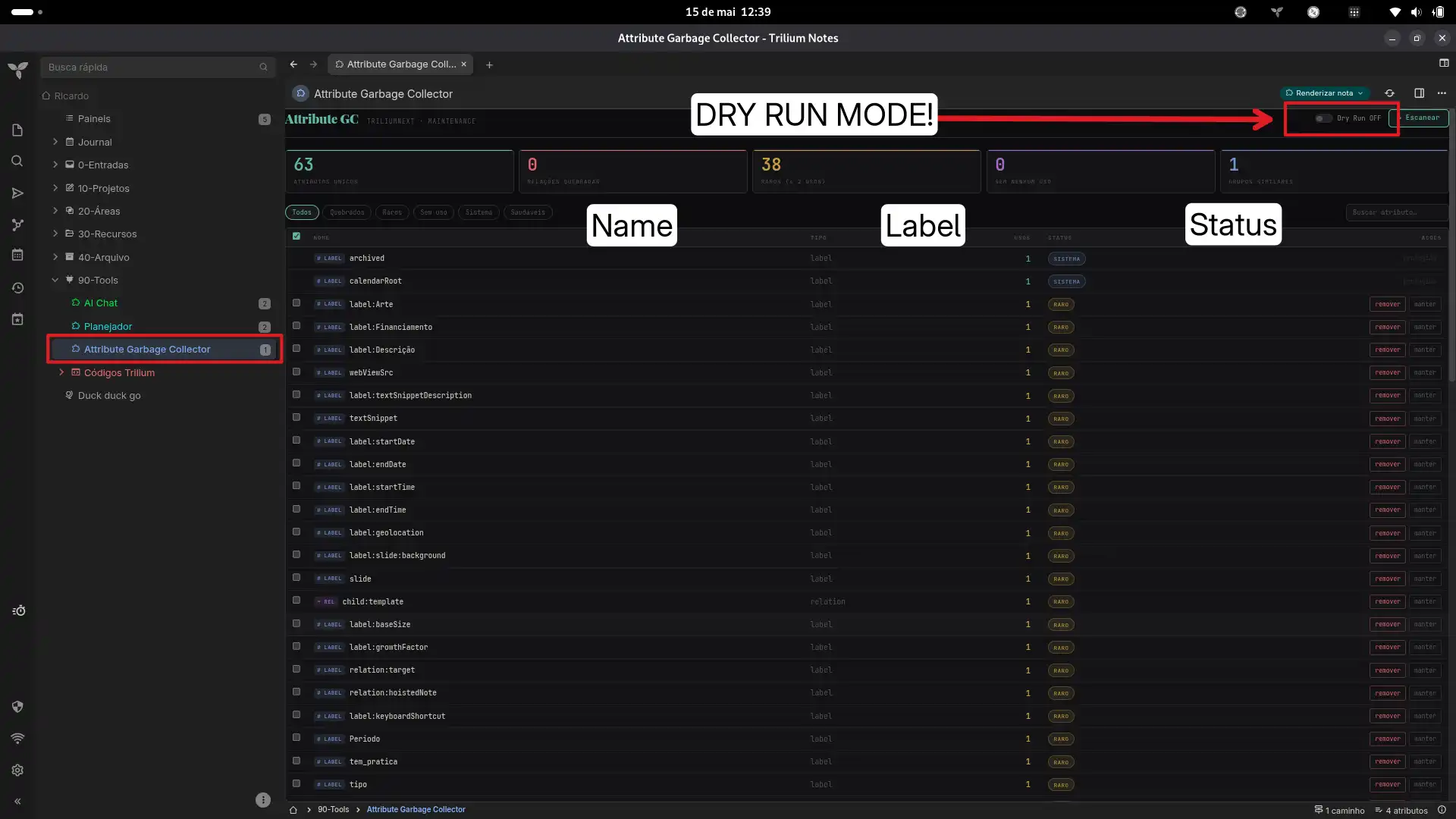
A garbage collector for TriliumNext attributes. Scans all notes to find broken relations, unused labels, rare attributes, and near-duplicate names. Lets you preview them in a dashboard — with batch delete on classic Trilium.
⚠ Status (TriliumNext): Detection works fully — all 83 notes, 66+ attribute groups scanned via
froca. Deletion in the UI succeeds (cache is updated, re-scan confirms), but changes are lost on page reload because TriliumNext's frontend froca cache doesn't sync writes back to the server in the Render Note sandbox. Classic Trilium (api.runOnBackend) path works end-to-end. See Persistence issue.
Features
- Full scan — Reads all notes via
froca(TriliumNext) orapi.runOnBackend(classic Trilium). Classifies every label and relation by usage count and health. - Broken relation detection — Finds relations pointing to deleted or missing target notes.
- Rare attribute flagging — Highlights attributes used ≤2 times, plus temp/draft/test patterns.
- Semantic duplicate finder — Uses Levenshtein distance to surface near-identical names (
pipelinevspipelne,autorvsautores). - Dry run mode — Toggle on to preview what would be deleted without making changes.
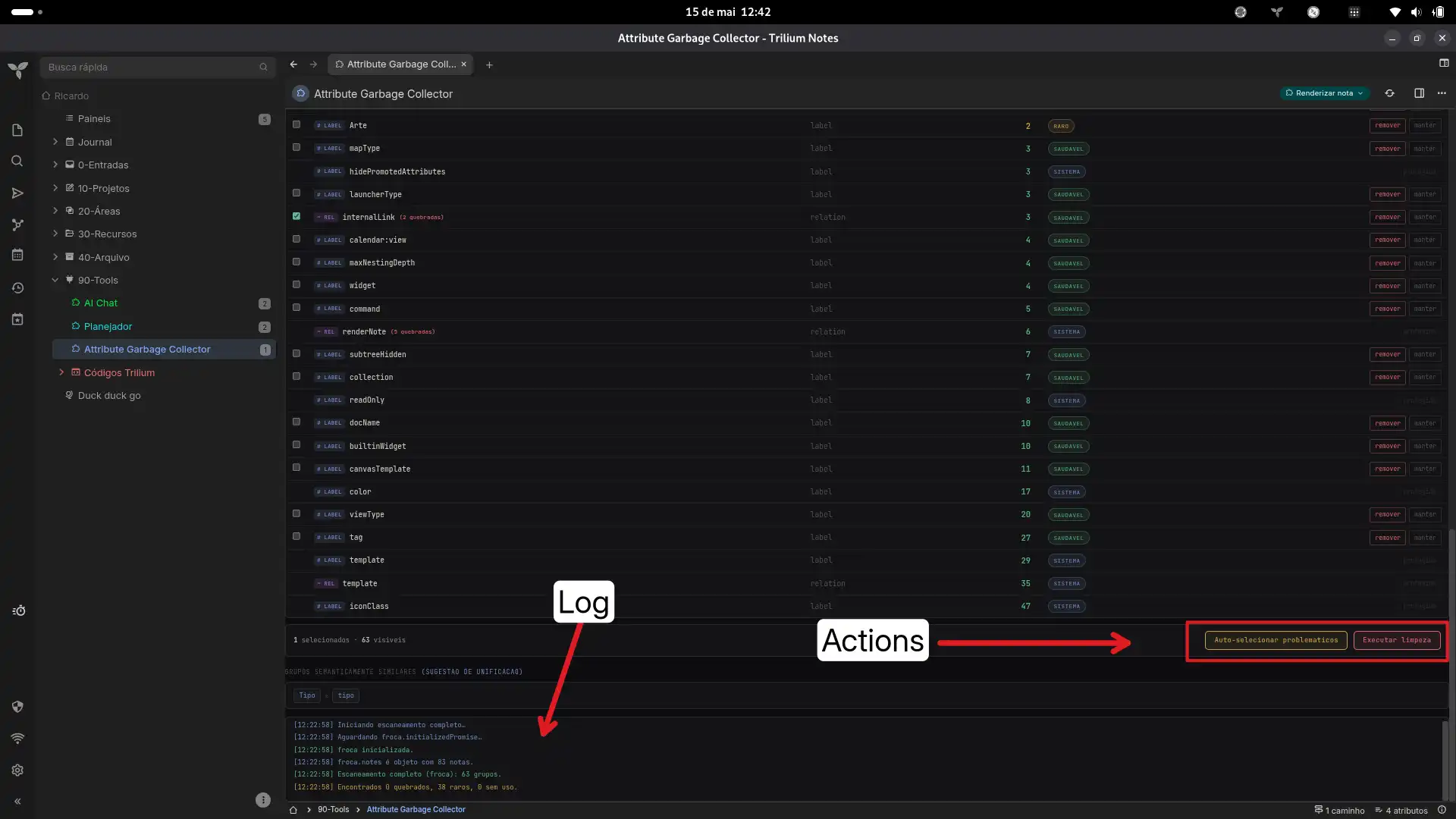
- Batch selection — Auto-select all problematic attributes with one click.
- Scoped CSS — All styles are prefixed under
#attrgc-root— nothing leaks into the Trilium UI.
Installation
-
In TriliumNext, import the .zip file (the plugin) into any root note of your choice (e.g., Tools, Plugins, or Add-ons).
-
The import contains two notes: a Render note and an HTML code note. Simply click on the Render note to view the panel.
Usage
- Click Escanear — the tool reads all notes and shows a dashboard of attribute stats.
- Use the filter tabs (Quebrados, Raros, Sem uso, Sistema) and search bar to narrow down.
- Click Auto-selecionar problemáticos to check all non-system problematic attributes, or tick individual checkboxes.
- Toggle Dry Run OFF (the yellow banner disappears).
- Click Executar limpeza → confirm. The tool attempts to delete and runs a re-scan.
In classic Trilium, deletion persists to the database. In TriliumNext, the re-scan will show the attributes gone from the cache, but they reappear on reload (see below).
Compatibility
| Environment | Scan | Delete | Notes |
|---|---|---|---|
| Classic Trilium | api.sql.getRows |
note.removeLabel / note.removeRelation |
Full end-to-end. |
| TriliumNext | froca.notes |
attr.update({ isDeleted: true }) |
Detects everything. Delete works in UI but not persisted. |
| Browser (demo) | Mock data | Simulated (noop) | For testing outside Trilium. |
⚠ Persistence issue (TriliumNext)
What works
- The froca path scans all 83 notes and 66+ attribute groups correctly.
note.getOwnedAttributes(type, name)returns properFAttributeobjects.attr.update({ isDeleted: true })marks attributes deleted in the frontend cache.- The re-scan confirms the deletions (groups count drops).
_clw.confirmSaveRelations()exists and returns a Promise (talks to backend), but is scope-limited to the relations panel and doesn't propagate general attribute deletions.
What doesn't
- On page reload, the froca cache is rebuilt from the server — deleted attributes reappear.
attr.update()andnote.update()are synchronous and local-only (no backend RPC).note.executeScript()only works on script-type notes, not on arbitrary text/HTML notes.api.runOnBackendis not exposed in the Render Note sandbox (it's available to JS Frontend notes viafrontend_script_api-*.js, but not to<script>tags in HTML Render Notes).- The REST API (
/api/notes,/api/tree) returns 401 —glob.getHeaders()returns an empty object, and session cookies + CSRF token don't authenticate from the sandbox.
Workaround ideas (for contributors)
- JS Backend note approach: Create a temporary JS Backend note, put the deletion script in it, execute via
note.executeScript(), then delete the temp note. - Proxy note mutations: Find how the TriliumNext UI (e.g. relation map) communicates attribute changes to the server and replicate that protocol.
- Module import: If dynamic
import()is available from Render Notes, try importingfrontend_script_api-*.jsto accessrunOnBackenddirectly.
Pull requests welcome for any of these approaches.
How it works
Scan (TriliumNext — froca path)
glob.getActiveContextNote() → froca → froca.notes / froca.attributes
The Render Note accesses TriliumNext's frontend object cache (froca) via the active context note. All notes and their attributes are already in memory — no backend calls needed. Broken relations are detected by building a Set of all valid noteIds and checking whether each relation's target exists.
Scan (Classic Trilium — SQL path)
If api.runOnBackend is detected, the tool runs SQL aggregation queries directly for maximum performance.
Delete (Classic Trilium)
api.runOnBackend → note.removeLabel() / note.removeRelation()
Uses the high-level entity API so Becca stays in sync.
Protected attributes
These system/internal attributes are locked and cannot be deleted:
template, workspace, iconClass, cssClass, run, runOnInstance, runAtStartup, shareAlias, shareHiddenFromTree, archived, pinned, bookmarked, weight, color, renderNote, child, runOnNoteCreation, noteType, mime, shareCss, shareJs, shareRaw, shareDisallowRobotIndexing, keyboardShortcut, label, relation, promoted, multiplicity, labelDefinition, relationDefinition, toc, readOnly, excludeFromExport, appCss, appTheme, sorted, sortDirection, sortFoldersFirst, top, hide, hidePromotedAttributes, disableVersioning, calendarRoot, dateNote, datePattern, inbox, sqlConsole, searchHome, hoistedNote, similarNotes, versioningLimit, mapRootNoteId, system, root
License
MIT
🌐 Language / Idioma
Note on language: Since I am from Brazil, the interface and text within this tool are currently in Brazilian Portuguese (PT-BR). However, you can easily translate them to English or your preferred language by simply opening the code files inside Trilium and replacing the text strings.
Images