5 KiB
Attribute GC — TriliumNext Maintenance Tool
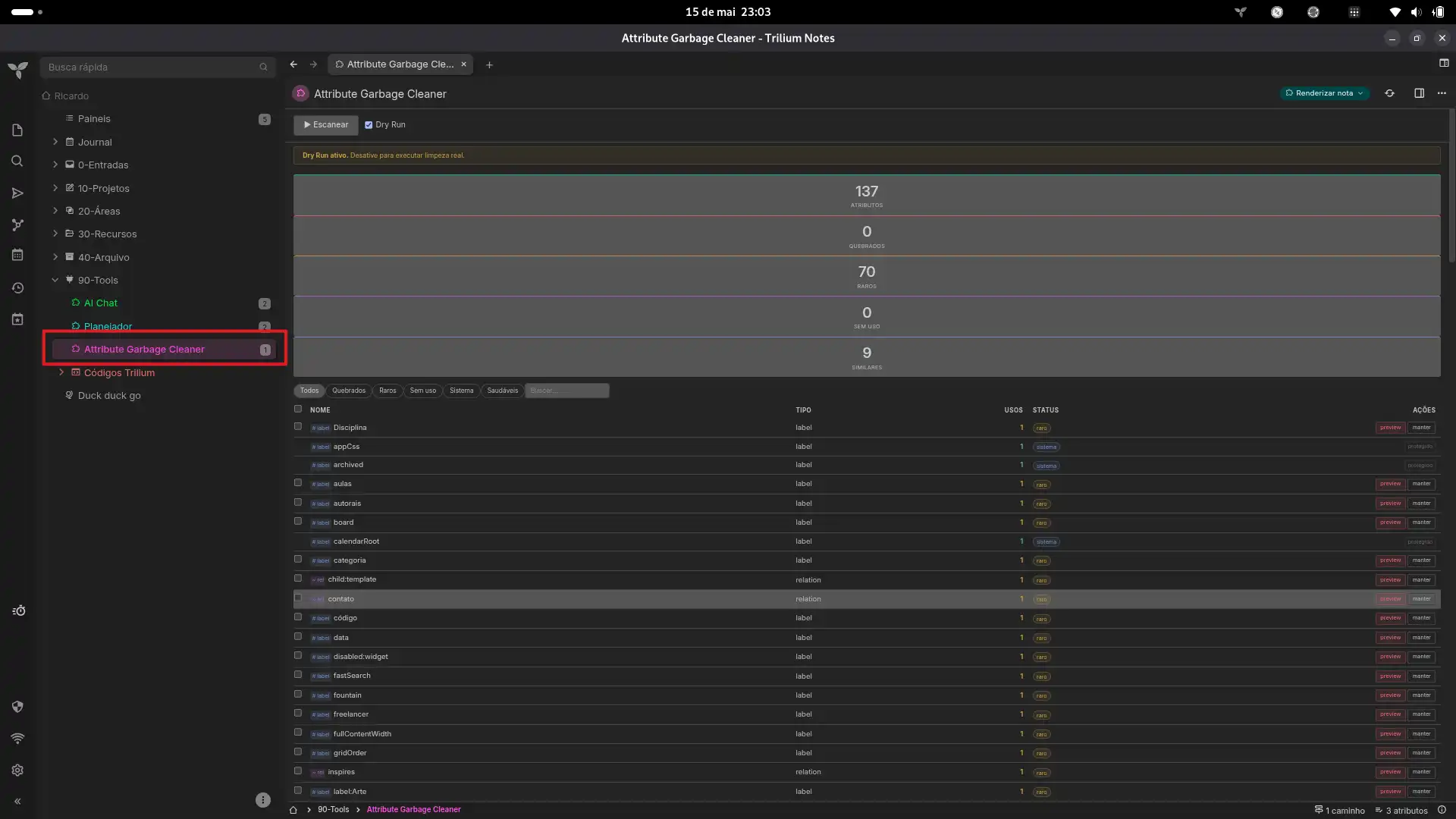
Scans all notes in your TriliumNext database for broken relations, unused labels, rare attributes, and near-duplicate names. Preview and batch-delete them — deletions persist.
v2.0 — Rewritten as a JS Frontend note with full
api.runOnBackend()access. Scan and delete both work end-to-end on TriliumNext. The previous HTML Render Note approach (v1.x) could only detect — deletion did not persist. See Why this works.
Features
- Full scan — SQL-backed via
api.sql.getRows. Classifies every label and relation by usage count and health. - Broken relation detection — Relations pointing to deleted or missing target notes.
- Rare attribute flagging — Attributes used ≤2 times, plus temp/draft/test patterns.
- Semantic duplicate finder — Levenshtein distance to surface near-identical names (
pipelinevspipelne,autorvsautores). - Dry run mode — Toggle on to preview what would be deleted without making changes.
- Batch deletion — Auto-select all problematic attributes, then delete in one click.
- Protected attributes — 50+ system/internal labels and relations are locked from deletion.
- Theme-aware — Uses Trilium CSS variables, matches your theme automatically.
Installation
- Create a JS Frontend code note in TriliumNext
- Paste the full content of
attribute-gc.js - Choose your mode:
- Right panel widget: add label
#widget, reload (Ctrl+R), open any note - Full-page Render Note: create a Render Note, add relation
~renderNote→ JS Frontend, open the Render Note
- Right panel widget: add label
Usage
- Click Escanear — stats dashboard appears with attribute counts
- Filter by status (Quebrados, Raros, Sem uso, Sistema, Saudáveis) or search by name
- Click Auto-selecionar to check all non-system problematic attributes, or tick individual rows
- Toggle Dry Run OFF (yellow banner disappears)
- Click Executar limpeza → confirm — attributes are permanently removed
The individual remover button on each row works the same way (skips the batch dialog).
Compatibility
| Environment | Scan | Delete |
|---|---|---|
| TriliumNext | api.sql.getRows |
getNotesWithLabel / removeLabel |
| Classic Trilium | api.sql.getRows |
getNotesWithLabel / removeLabel |
Both use the same backend path — api.runOnBackend() with the standard entity API. Becca stays in sync, changes persist.
Why this works
v1.x used an HTML Render Note with inline <script> tags. TriliumNext sandboxes HTML notes — api is not available, fetch() calls return 401, froca mutations are local-only, and all deletion attempts failed to persist.
v2.0 is a JS Frontend note — the standard Trilium extension format (same as Canvas Linker, Word Count, Task Planner). It has direct access to:
api.runOnBackend()— execute backend codeapi.sql.getRows()— SQL queries for fast aggregationapi.getNotesWithLabel()/api.getNotesWithRelation()— find notes by attributenote.removeLabel()/note.removeRelation()— delete through the entity lifecycle
No hacks, no workarounds. The same pattern used by every other Trilium plugin.
How it works
Scan
api.runOnBackend(() => {
    // SQL aggregation — one query, instant results
    api.sql.getRows(`SELECT name, type, COUNT(*) ... GROUP BY name, type`);
    // Broken relation detection
    api.sql.getRows(`SELECT ... LEFT JOIN ... WHERE target IS NULL`);
});
Delete
api.runOnBackend((names, types) => {
    for (const name of names) {
        const notes = api.getNotesWithLabel(name);  // or getNotesWithRelation
        for (const note of notes) {
            note.removeLabel(name);  // goes through Becca → persisted to DB
        }
    }
}, [names, types]);
Context detection
The same JS file auto-detects whether it's loaded as a widget (#widget label) or a render note dependency (~renderNote relation), adjusting layout and sizes accordingly.
Protected attributes
template, workspace, iconClass, cssClass, run, runOnInstance, runAtStartup, shareAlias, shareHiddenFromTree, archived, pinned, bookmarked, weight, color, renderNote, child, runOnNoteCreation, noteType, mime, shareCss, shareJs, shareRaw, shareDisallowRobotIndexing, keyboardShortcut, label, relation, promoted, multiplicity, labelDefinition, relationDefinition, toc, readOnly, excludeFromExport, appCss, appTheme, sorted, sortDirection, sortFoldersFirst, top, hide, hidePromotedAttributes, disableVersioning, calendarRoot, dateNote, datePattern, inbox, sqlConsole, searchHome, hoistedNote, similarNotes, versioningLimit, mapRootNoteId, system, root
🌐 Idioma / Language: A interface está em português brasileiro (PT-BR). Para traduzir, abra o arquivo attribute-gc.js no Trilium e substitua as strings de texto.
License
MIT
Images