4.9 KiB
Attribute GC — TriliumNext Maintenance Tool
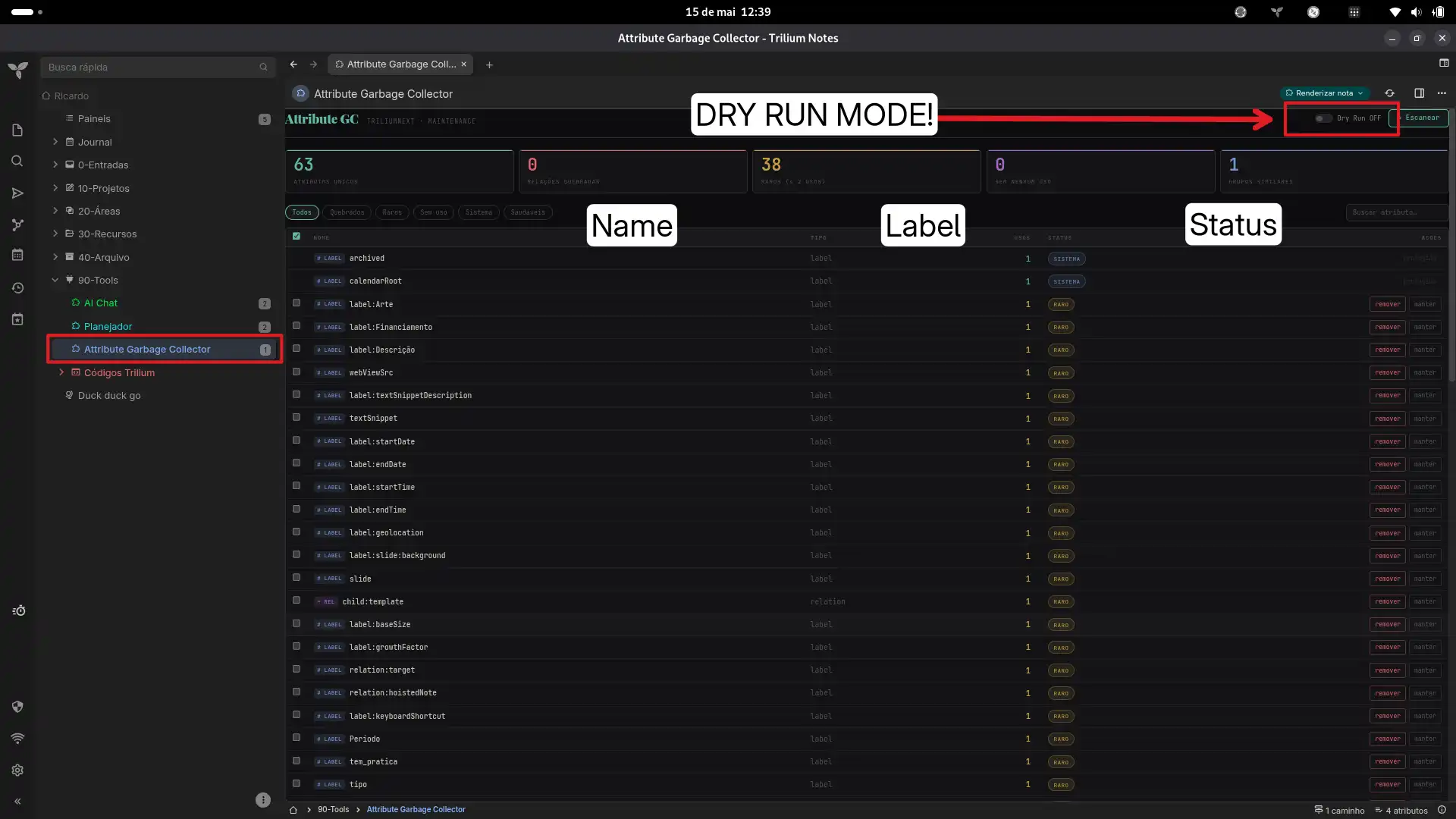
A garbage collector for TriliumNext attributes. Scans all notes to find broken relations, unused labels, rare attributes, and near-duplicate names. Lets you preview and safely delete them — either individually or in batch.
Features
- Full scan — Reads all notes via
froca(TriliumNext frontend cache) orapi.runOnBackend(classic Trilium). Classifies every label and relation by usage count and health. - Broken relation detection — Finds relations pointing to deleted or missing target notes.
- Rare attribute flagging — Highlights attributes used ≤2 times, plus temp/draft/test patterns.
- Semantic duplicate finder — Uses Levenshtein distance to surface near-identical names (
pipelinevspipelne,autorvsautores). - Dry run mode — Toggle on to preview what would be deleted without making changes.
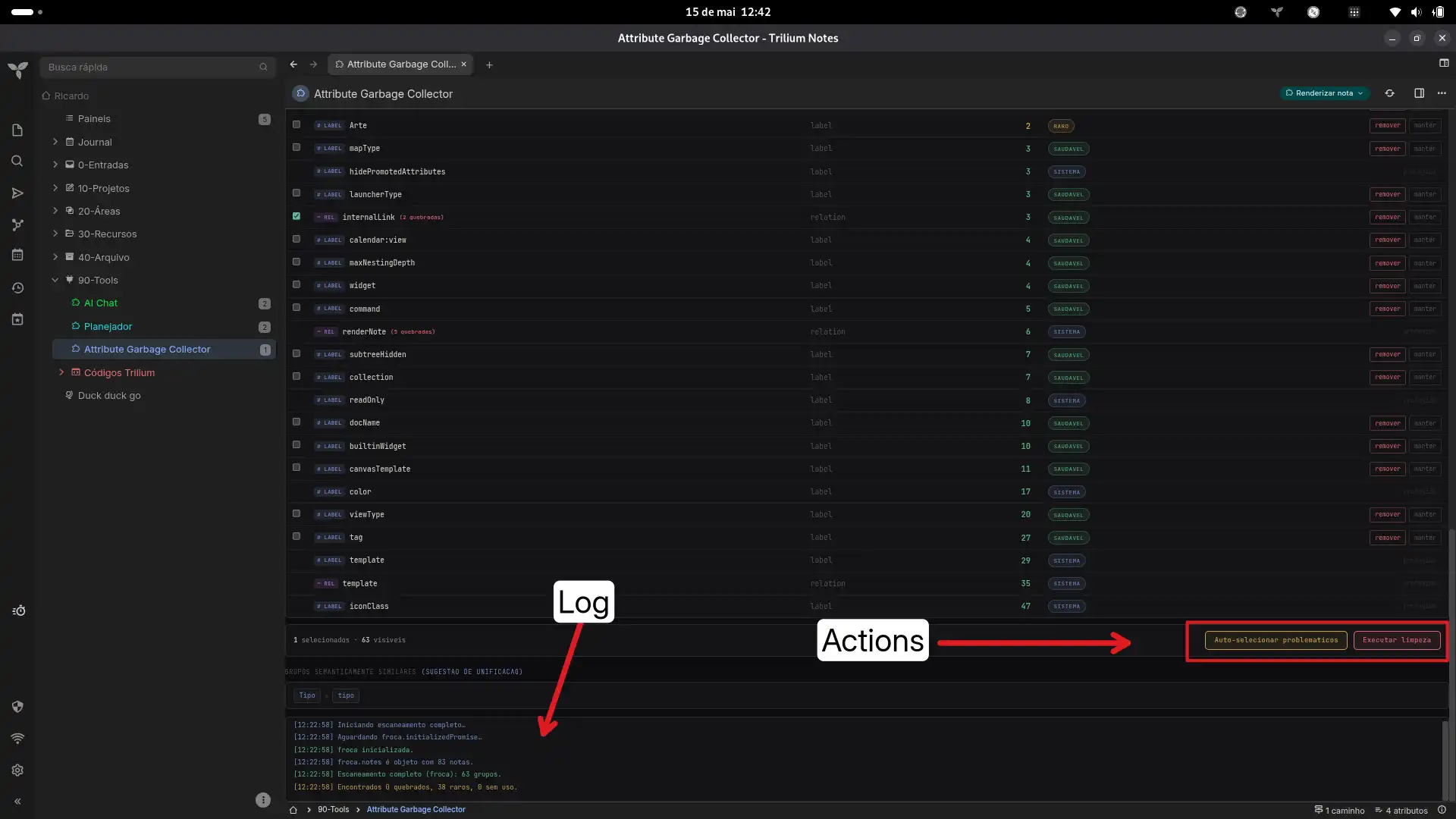
- Batch operations — Auto-select all problematic attributes, then delete them in one click.
- Scoped CSS — All styles are prefixed under
#attrgc-rootso nothing leaks into the Trilium UI.
🌐 Language / Idioma
Note on language: Since I am from Brazil, the interface and text within this tool are currently in Brazilian Portuguese (PT-BR). However, you can easily translate them to English or your preferred language by simply opening the code files inside Trilium and replacing the text strings.
How it works
Scan (read)
glob.getActiveContextNote() → froca → froca.notes / froca.attributes
The note accesses TriliumNext's frontend object cache directly. All notes and their attributes are already in memory — no backend calls needed.
Delete (write)
note.getOwnedAttributes(type, name) → attr.update({ isDeleted: true })
Finds attribute objects on each note via the standard prototype method, then marks them deleted through the entity's own update() method. The change syncs to the backend automatically.
For relations, only broken instances (target note missing or deleted) are removed. For labels, all instances of that name are removed.
Classic Trilium fallback
If api.runOnBackend is available (classic Trilium), the tool uses SQL for scanning and removeLabel / removeRelation for deletion.
Installation
-
In TriliumNext, import the .zip file (the plugin) into any root note of your choice (e.g., Tools, Plugins, or Add-ons).
-
The import contains two notes: a Render note and an HTML code note. Simply click on the Render note to view the panel.
Usage
- Click Escanear — the tool reads all notes and shows a dashboard of attribute stats.
- Use the filter tabs (Quebrados, Raros, Sem uso, Sistema) and search bar to narrow down.
- Click Auto-selecionar problemáticos to check all non-system problematic attributes, or tick individual checkboxes.
- Toggle Dry Run OFF (the yellow banner disappears).
- Click Executar limpeza → confirm the dialog. The tool removes the selected attributes.
- A green banner flashes briefly, and a re-scan runs to confirm the new counts.
The individual remover button on each row works the same way — skips the batch dialog.
Protected attributes
These system/internal attributes are locked and cannot be deleted:
template, workspace, iconClass, cssClass, run, runOnInstance, runAtStartup, shareAlias, shareHiddenFromTree, archived, pinned, bookmarked, weight, color, renderNote, child, runOnNoteCreation, noteType, mime, shareCss, shareJs, shareRaw, shareDisallowRobotIndexing, keyboardShortcut, label, relation, promoted, multiplicity, labelDefinition, relationDefinition, toc, readOnly, excludeFromExport, appCss, appTheme, sorted, sortDirection, sortFoldersFirst, top, hide, hidePromotedAttributes, disableVersioning, calendarRoot, dateNote, datePattern, inbox, sqlConsole, searchHome, hoistedNote, similarNotes, versioningLimit, mapRootNoteId, system, root
Compatibility
| Environment | Scan | Delete |
|---|---|---|
| TriliumNext | froca.notes |
attr.update({ isDeleted: true }) |
| Classic Trilium | api.sql.getRows |
note.removeLabel / note.removeRelation |
| Browser (demo) | Mock data | Simulated (noop) |
Technical notes
- The tool renders as a Render Note in TriliumNext — no build step, no dependencies.
- All CSS is scoped under
#attrgc-rootto prevent style conflicts with the Trilium UI. - The delete path uses
getOwnedAttributes(type, name)(prototype method onFNote) to retrieve attribute objects, then callsupdate({ isDeleted: true }). No raw SQL modifications — all changes go through the entity lifecycle. - Broken relations are detected by building a
Setof all validnoteIds and checking whether a relation's target exists in that set.
License
MIT
Images